Monday, 25 January 2016

How to use Facebook’s new Audience Optimization Targeting

This article was originally published on our sister site ClickZ, but it’s so helpful we thought we’d share it here too.

Another week, another Facebook feature. Over the past few years, declining organic reach has become a major issue for publishers using Facebook.

Facebook audience optimisation

While this is partly a rod we’ve made for our own backs due to our ravenous search for ever-increasing ‘Likes’, it’s good to see the platform launching tools that are specifically designed to combat this.

I thought I’d check out the new Audience Optimization Tool and see how – and if – it can help get my superbly crafted* social media messages to a wider audience

*If you use the word ‘crafted’ to describe your marketing messages, you should probably go home and have a long hard think about your life. Your business will be better off without you.

First things first, let’s check out Facebook’s official ‘How To’ guide:

FB audience 2

This all seems easy enough, although in practice the instructions are rather poorly written. If I currently head to settings then I won’t actually see ‘Audience Optimization for Posts’ if I have more than 5,000 ‘Likes’.

FB audience 3

Facebook explains that the feature will automatically be turned on for larger pages, but it would be more useful/make more sense if all pages could at least see the option.

To be honest, Facebook has a long history of writing confusing guides though, so let’s chalk it up to experience and move on. Here’s how to turn the feature on if you have less than 5,000 ‘Likes’:

Facebook optimisation

  1. Head to your settings.
  2. Under the ‘General’ heading, select ‘Audience Optimization for Posts’ and turn feature on.
  3. You’re ready to roll.

Again, the confirmation language is slightly odd, implying that you may have actually restricted your audience, although this is not actually the case.

fb5

Now let’s try posting something.

Oddly, this feature is not yet available inside Business Manager, or for posts that are created using the Power Editor. I’m going to assume that there are two reasons for this.

Firstly, posts created in Power Editor have CTAs built in, and are generally designed to drive traffic directly to a site.

By limiting this, Facebook is clearly encouraging you to create posts that work within Facebook’s walled garden. Essentially, use this if you want reach and engagement, but not if you’re looking for traffic. Secondly… Facebook may just be tired of no one knowing how to use Power Editor properly, and have decided not to swim against the tide.

Add a link as you normally would, and then select the small ‘Crosshairs’ icon underneath to add ‘Interest Tags’. Essentially these are just the old Interest categories, but according to Facebook they operate in exactly the opposite way.

fb6

In the past, interest targeting would restrict the audience that could view your post.

While this option is still available, here Facebook promises that interests will help surface relevant posts to a wider organic audience, although whether this presents your posts to users who have not yet ‘Liked’ your page, or simply adds yet more jiggery-pokery to the algorithms of existing fans is not revealed.

fb7

I’m testing this from Search Engine Watch’s Facebook page (what do you mean you aren’t a fan? Hop to it!), so I’ve rather obviously chosen ‘Search Engine Optimisation as a category.

Facebook tells me that the potential audience is a massive 19,870,820, although obviously there are differing levels of value and actual interest there.

fb8

Once you’ve chosen your first category Facebook will also serve up some suggestions. This may be me, but again, these seem strangely worded.

‘Web Banner’ seems like a weird thing to be interested in, but I would assume these are based on the stated interests of users. I play it safe and choose ‘Social Media Optimization’ and ‘Digital Marketing’ as secondary categories.

fb9

Hit ‘Publish’ and away you go.

fb10

So… did it work?

SEW has just over 37,000 fans on Facebook, and based on the time of posting (10am GMT on a Friday), I’d expect a low organic reach of about 300 users initially. I waited a few hours and checked back at 3pm to find… my post had reached 380 people.

fb11

So initially, no more or less than I’d have expected. There are of course any number of reasons this didn’t resonate with users.

I deliberately toned down the copy a little, although the content itself was very appealing (go read the post if you don’t believe me). It was early on a Friday – typically a slow day – and it’s possible this may increase once our US audience comes online later in the day.

I’m going to sit on the fence on this one, and guess that the low reach difference is down to how new the feature is. Facebook is obviously not going to show my post to every user on the first attempt, although I’m going to make the correlation that this feature does only reach existing fans.

It’s clearly designed as an engagement tool, which can only be a good thing, but I’d think carefully about your business goals before regularly using this.

I’d be fascinated to hear if you are seeing different results from this tool, and I’ll be sure to post an update in a month or two to see how results develop.


The article How to use Facebook’s new Audience Optimization Targeting was first seen from https://searchenginewatch.com

3 Linking Concerns to Consider in Your Video SEO Strategy

It’s no secret that video is becoming crucial to online marketing success because they’re so easy to digest. Video makes it easy for readers to learn about a specific task, keeps them interested and engaged, and helps the information stick in their memories. According to a HubSpot collection of statistics, using the word “video” in an email subject line boosts open rates by 19%, CTR by 65%, and reduces unsubscribes by 26%. In other words there really isn’t any reason not to get started with a video marketing strategy today, the only hesitation is likely where to begin.

Whether it be a step-by-step instruction video or an expert in your company talking about the latest industry news, it’s important to consider how you can optimize your video so it has the reach and the stickiness that will drive people to your website, keep them there, and hopefully lead to a conversion.

A Few Ways to Optimize Your Small Business Video

The idea and reasoning behind wanting to optimize a video for search is the same as optimizing a piece of traditional content. You still want this video to get to the top of search engines, YouTube being included as a search engine, and many of the tactics are very similar. Below are a few ways to make it happen:

Use keywords and related phrases in your title, description, and tags.

YouTube as well as Google bots can only tell what a video is about based upon the text that you put onto the page. Therefore, keywords are very important (which is slightly different than traditional text where Google is trying to make keywords less important). Use keywords in your title and description, and try to use your keywords as well as related words in the Meta tags of your video. YouTube finds similarities between tags when it comes to placing related videos on the side of the page, so this could help you earn more clicks.

Use video rich snippets to catch a reader’s attention.

Rich snippets are little snippets of your video that will appear on a Google search engine results page (SERP). This helps your video jump off the page to those using Google to search for information whether they were looking for a video or not. Below is a great screenshot example of the search query “how to dance”:

snippets

Don’t forget to include a transcription.

A transcription is a good way to first, help your readers follow along and understand the video better, and second, get more content onto that webpage. The bots for both Google and YouTube will be able to index your page best if they know exactly what is going on in the video, and a transcription makes this possible. Your video will get put in front of the eyes of more relevant readers and everyone wins.

Of course, before you can optimize a video you have to actually create and post a video. Videos are typically posted on a company webpage and/or that company’s YouTube channel. You can visit the YouTube Creator Hub to learn how to decide what type of video to make, how to actually make the video, and then how to put that video online.

So What are the Linking Considerations?

There are essentially two different ways that linking comes into play:

  • Earn Backlinks. You can still earn backlinks for your video webpage the same way you earn backlinks for your traditional content. If you are ever writing a guest post and a video you’ve created is relevant, include that link. You an use a tool like Monitor Backlinks or Open Site Explorer to help keep track of your links and where you’re having the most success.
  • Include On-Page Links. This refers to videos that are placed on YouTube. In the description section of the video you can put a link back to where the video originated. This oftentimes drives YouTube viewers to your website to learn more. After all, if they are watching your video on YouTube chances are they are serious about that particular topic and will go that extra mile (or extra click to be exact).
  • Market Your Video on Social. As discussed above, you should still be trying to earn links around the web, but you can take matters into your own hands by including your video on your social media accounts. This can help you earn shares, which hopefully will help you earn natural links in the end.

The Takeaway and Extra Resources

In the end, optimizing your video isn’t too different than traditional content in respects to linking. You still want to build links naturally if you can, and you still want to include internal links through things like YouTube annotations when relevant. Check out some of our other videos on YouTube and video SEO below:

How to Use YouTube Remarketing to Generate More Quality Leads

Metrics to Watch for YouTube Marketing Success

YouTube Customization Options You’re Still Missing

Creating a Video Marketing Strategy for SEO

How to Create a Video Ad Campaign and Why It Matters

As you can see, there is quite a bit you can do with video marketing (particularly when dealing with YouTube). It’s best to start with the basics of optimization first and then start getting into some of the customization and more advanced optimization techniques referenced above.

Have you ever made a video to help get your readers interested in your website? What did you do to optimize this video? Let us know your thoughts in the comments below.


The post http://www.highervisibility.com/3-linking-concerns-to-consider-in-your-video-seo-strategy/ appeared first on http://www.highervisibility.com

The hidden social media dangers for all businesses

Everyone is telling you to use social media – but who’s telling you to be careful?

Despite what some may suggest, social media is not all that new. As far as I’m concerned, it’s old – very old. News groups, email boards, forums, shout-out and guest boxes, rating, review and comment systems etc. You can see where today’s social media originates from.

And yet, despite it maturing slowly over time, and having plenty of users and uses, I’m still not seeing many people waving a warning flag, violently pointing to the danger signs or trying to help people see the potentially massive holes that social media has for you, your staff, your company and your reputation.

*puts on best old-sea-dog voice*
There be dangers in social media!

social media minefield

Sources of risk:

Though we can slice and dice this numerous ways, I think sticking to broad and clear labels saves a lot of confusion. I’m sure you can work out the finer details and individual items based on the following…

Yourself and employees
Often one of the greatest assets, you or your staff can also be one of the biggest liabilities. From accidentally letting slip confidential information, through to intentional leaks, or silly slipups, mistypes or plain old bad behaviour that calls your company or industry into disrepute.

Ex-employees
There’s nothing like a scorned employee – and social platforms can be a prime way to lash out at you for revenge. Accidents are unlikely, if it’s an ex-employee, it’s going to be intentional.

Clients, customers and consumers
Straight from the horse’s mouth – people put a lot of weight on what current and pre-existing customers or clients say about you, your services or your products. Unhappy consumers making bad reviews, publicly complain or generally make a stink can cause you to lose new business.

Competitors
Some of you may have competitors that are happy to play dirty. They may create fake profiles, post false complaints or leave bad reviews. In extreme cases they may even attempt to impersonate staff or misrepresent your company.

Reputation hitmen
It’s a dirty little secret – but there are those out there that have practiced and developed ways to damage the reputation and social presence. These don’t tend to be random; they are usually hired to do the dirty deed. The problem is they won’t be amateurish about it, and are harder to spot.

Infiltrators
A completely different class of problem is hackers. There are some that use social media as an attack vector. They may harvest information from publicly accessible information on profiles etc. Then they attempt impersonate other staff, or make various identity claims in an effort to obtain access credentials or details.

The media
Sometimes things create a stink, and there seems to be nothing that attracts the media like a bad smell. If you think having a bunch of people kicking you on Twitter is bad, wait until some reporter gets a whiff of things!

Trolls, flamers and crusaders
It happens, more often than you may realise – absolute strangers may come along and cause various types of trouble. Topics may become confused, foul language and insults appear, attempts to get others involved or blow things out of proportion. Suddenly your workload has become larger and harder, and you will be tempted to say or do stupid things that could worsen the situation or create a whole new one.

trolls-flamers-champs

Types of damage
There’s no shortage of ways your reputation may be harmed, or your social interactions hindered. Rather than trying to list them all (and make you read them all), I’ll generalise them a little. The broader types of damage include:

Rumours
Though not necessarily a danger, these can get out of hand and cause you problems. Worse yet, they have a nasty habit of being bandied around as ‘fact’. Though these usually don’t cause harm per-se, they may still impede your efforts and require resources to handle. They also have a nasty habit of reappearing or being brought up at the worst possible time.

Mistakes
From silly typos and bad spelling, through to things that should never (ever!) have been written – you or your staff may post or publish something that shouldn’t have been. Sure you can Edit it or Delete it. Unfortunately it may already have been seen and screen grabbed, caught and posted elsewhere, crawled, indexed and cached etc. Those silly little mistakes you got rid of may still come back and bite you. Worse yet, it may end up looking like a cover-up!

Misunderstandings
It happens – people get the wrong end of the stick, the wrong thing is said at the wrong time, or to the wrong person, ambiguous wording is used, too much is read from what is posted, not enough thought is applied to what is said, a mistype or spelling issue can result in a different meaning etc.
No matter the cause, someone will get upset over it.

Imprudence
Sometimes people will say, do or post stuff that they think is acceptable – with no regard for people’s sensibilities. Those inane comments, silly pictures or (supposedly) witty remarks may well turn out to be very unfunny and not so trivial in the future.

Misguided behaviour
A situation, issue or problem may be portrayed different from the actuality. This may result in people responding in ways that aren’t quite appropriate or correct. In other cases, staff may simply think they are doing the right thing, but are doing anything but the right thing. These good intentions may end up causing all sorts of problems.

Misbehaviour
Poor and unprofessional conduct, or generally unacceptable antics and behaviour can be a nightmare to deal with. There’s no telling how people may react. It could be beneficial, it could be made useful, or it could a major clean-up operation.

Leaks
Let’s face it – most corporations and companies have at least a little dirty laundry. Having it in public view can be a highly unpleasant experience, and sometimes, those stains just won’t come out.

Mistreatment
Treating others poorly may come back to bite you – and bite you hard! Failing to meet your obligations is bad enough – adding insult to the injury is far worse. Others seeing such mistreatment may be put off. Worse yet, they may talk about it to others, causing even more harm to your reputation.

Dissatisfaction
The truth can hurt – and having it shouted out in public can hurt a whole lot more. Having dissatisfied customers/clients that post their concerns and complaints in public can cause some harm. Worse yet, there is a niche industry that seems to thrive on such issues

Lies and fakes
This is unfortunately far more common that anyone would like – and comes in all shapes and sizes. You’re looking at poor ratings and bad reviews, through to false complaints, defamation and character assassination.

Imposters
One of the nastier hazards, it’s possible that others may pretend to be you, an employee or a representative – and then conduct themselves in an unpleasant manner, or post damaging comments/content.

Called out
It doesn’t matter if it’s done in a polite and professional manner, or by someone behaving like a 10 year old who’s eaten too much sherbet – no one wants to be called out, especially publicly! I can’t think of much worse than some smart-alec poking holes, picking fault, undermining your efforts or making you look stupid. (Yes, I laughed evilly whilst typing that one up :D)

Breaches
Some industries have strict regulations regarding media and communications. It’s entirely possible for a post to be made with content that falls short of such requirements, and leave your company exposed to punitive repercussions.

Misassigned
This is one of my favourites, when someone sends a communication to the wrong person(s), or a tweet instead of a direct message. This can cause all sorts of holy hell, especially if it’s sensitive data or information that is then publicised.

Mishandling
Sometimes we simply make things worse. What was originally an issue of one size can easily become a larger issue due to poor responses, unprofessional conduct, miscommunication, going on the attack or any number of the other items mentioned.

doctors studying the brain

Compounding it all:

As if there weren’t enough sources or types of damage – it can get worse. Just look at these additional complications…

Private to public
The standard social media risk, the transition from private to public. Dealing with complaints, employee concerns and competitors can be difficult enough. Having the doors flung open and it playing out in front of an audience – one that may judge against you – it can get a darn sight worse.

Loss of control
Aside from the resource costs and potential damages – one of the harder to deal with aspects is the general lack of control you end up with. It can feel like trying to stem an avalanche with a teaspoon. This is especially true with public and third party platforms.

Out of proportion
The immediate thought here is the press – well known for taking a grain of salt and turning it into Sodom and Gomorrah. That said, the public has a big old nasty streak too, and you may find even the smallest infraction being blown out of proportion.

Hijacking
You may have a topic and a goal. You may even have a plan. Unfortunately, there is no guarantee that anyone will follow it once it’s out there. Others may take it in a different direction, or usurp control of the conversation. All of a sudden, your plans are useless and your post is at full steam in the wrong direction, driven by someone else.

Perversion
People can be pretty strange, and if we’re completely honest – kind of scary. It’s amazing how even the most innocent, most well intentioned thing can be taken hold of and twisted into something dirty or wrong. Hashtags can be misread (Blackberry and #rimjobs), or your campaign can be turned against you (McD Stories).

Carved in electrons
Possibly one of the worst factors to consider is that, in many cases, what happens online becomes a matter of record. Though the general internet attention span may not be much more developed than that of plankton – the internet has a very long and exact memory. Screen shots, archives and caches… things may stick around far longer than you’d like.

Open season
Just when you thought things couldn’t get worse, you discover someone has not only stuck a pair of antlers on your head, they’ve painted a bullseye on your backside – and it seems everyone is out with a rifle and looking right at you. Even though the infraction seemed small, harmless and happened two weeks about – disgruntled people have created profiles just so they can post snarky comments about you and your company.

open season on mooses

Scared? You should be!


Okay – I’m lying. You don’t have to be scared – but you should be cautious.
The above is merely a collection of warnings and worst case scenarios. Most people and businesses manage to use social media without killing their reputation, or being randomly trolled by people with far too much time on their hands.

The truth is that social platforms and communities offer many advantages and benefits – but it pays to be mindful. So while you sit there figuring how you are going to win over your audience, sway influencers and generate some links… keep the above in mind.


The article The hidden social media dangers for all businesses was first seen from https://searchenginewatch.com

Friday, 22 January 2016

Seven of the most interesting SEM news stories of the week

Welcome to our weekly round-up of all the latest news and research from around the world of search marketing and beyond.

This week: Google begins experimenting with its PLAs, there are some stats on ad spend, we answer “what is the most trusted media source?” (I’ll give you one guess) and there’s a very tenuous time-frame for when Penguin is arriving.

How Google fought bad ads in 2015

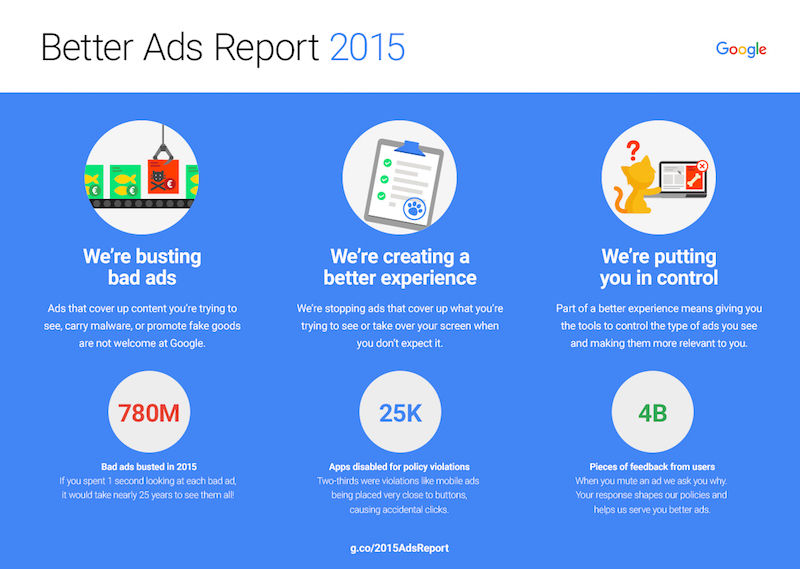
Google has released a report on how it helped to clean up the bandit-populated wasteland we call the internet. Google has more than 1,000 sheriffs dedicated to taking down bad ads. In fact 780m ads were shot down from the top of saloon bar roofs on to the hay bails below or drowned in a horse trough.

Here are some of the black-hatted baddies Google busted in 2015:

  • Counterfeiters: Google suspended more than 10,000 sites and 18,000 accounts for attempting to sell counterfeit goods.
  • Pharmaceuticals: blocked more than 12.5 million ads that violated healthcare and medicines policy.
  • Weight loss scams: suspended more than 30,000 sites for misleading claims.
  • Phishing: stepped up efforts to fight phishing sites, blocking nearly 7,000 sites as a result.
  • Unwanted software: disabled more than 10,000 sites offering unwanted software, and reduced unwanted downloads via Google ads by more than 99 percent.
  • Trick to click: toughened up on ads designed to look like system warnings from your computer. Google rejected more than 17 million.

google better ads report

Social ad spend increased 50% year-over-year

New research from Kenshoo (gesundheit) suggests that spend on social advertising increased by 50% in the final quarter of 2015 with most of that growth helped along by the introduction of Facebook Dynamic Product Ads and Instagram ads.

Spend on search advertising increased by 8% thanks to a growth in retailers’ use of product-focused seasonal Product Listing Ads (PLAs), while mobile continues to be the biggest driver of growth in both search and social.

While there were fewer impressions for social ads in the quarter, the Click-through-Rate (CTR) went up by 64% YoY resulting in 30% more clicks and CPC went up 10% compared with the previous year.

Google adds AMP error report preview in Search Console

As Accelerated Mobile Pages become an increasingly important facet of mobile optimisation, Google has announced that it will provide a preview of error reports in Search Console, ready for the official launch of AMP in February.

This is direct from the source:

“The AMP error report gives an overview of the overall situation on your site, and then lets you drill down to specific error types and URLs. This process helps you quickly find the most common issues, so that you can systematically address them in your site’s AMP implementation (potentially just requiring tweaks in the templates or plugin used for these pages).”

amp pages attributes

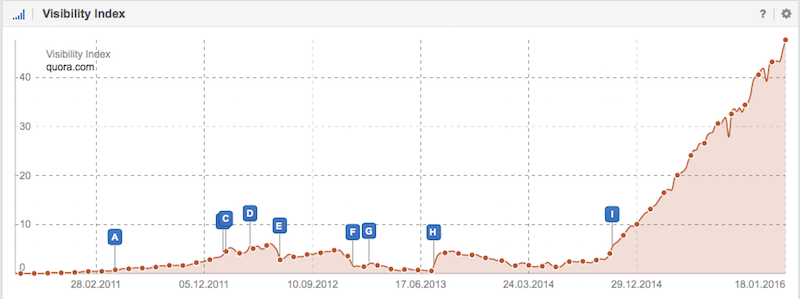
Quora tops the list of UK sites gaining the highest increase in Google visibility

IndexWatch announced the sites that made the most ground in the battle of the Google SERPs in 2015, with the crowd-sourced question and answer site Quora.com coming first, with an improvement of +298.21% on the previous year. This was closely followed by Wilko.com, MentalFloss.com, Zomato.com and Wayfair.com.

visibility-quora.com

There are more details and the full top 100 here.

Bye bye organic results! Hello MASSIVE PLAs!

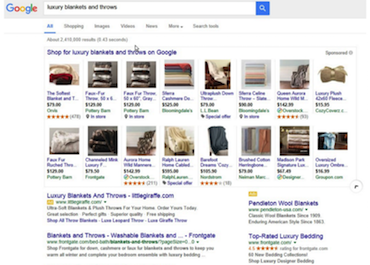
As Chris Lake reported this week, Google has begun experimenting with an expandable mega layout for its product listing ads.

expanded plas

This new layout includes a clickable arrow icon that doubles the number of products and essentially takes over the entire SERP. Bad for organic results, good for retailers still struggling to rank highly for their products as it gives them a bigger playground to… uh… fill with ads.

Here’s a horrible vision of the future courtesy of Chris Lake…

massively expanded plas

Google is more trusted than actual news sources

The Edelman Trust Barometer has revealed that for the second year in a row, people trust search engines more than they trust the actual sources providing the news itself.

Search engines also beat social media, but that’s probably not as surprising.

Why do people trust search engines so much? Possibly because they see an appearance of an article ranking highly in the SERPs as a mark of trust, also it might be because Google News offers an array of different headlines from various sources, so it’s easy to make a comparison of them all.

Search Engine Watch’s own weekly SEM news round-up will patiently wait for next year’s results to see how it did. Sigh.

Google’s next Penguin roll-out to happen within weeks

This from Gary Illyes, Google’s Webmaster Trends analyst…

You can decide for yourself whether this counts as ‘news’ or whether Illyes just got tired of all the pestering.


The article Seven of the most interesting SEM news stories of the week was first seen from https://searchenginewatch.com

Thursday, 21 January 2016

SEO basics: 22 essentials you need for optimizing your site

Here we’ll take a look at the basic things you need to know in regards to search engine optimisation, a discipline that everyone in your organisation should at least be aware of, if not have a decent technical understanding.

One of our most popular articles of all time is a post entitled SEO Basics: 8 Essentials When Optimizing Your Site. It still does the business for us in terms of traffic, however it was first published in April 2013, so you can treat this as its long overdue and expanded update.

What is SEO?

Quite simply, SEO is the umbrella term for all the methods you can use to ensure the visibility of your website and its content on search engine results pages (SERPs).

The methods vary from technical practices you can achieve behind the scenes on your website (we tend to refer to this as ‘on-page SEO’) to all the promotional ’off-page’ approaches you can use to raise your site’s visibility (link-building, social media marketing).

For the purpose of this article, when we talk about visibility, we mean how high up the SERP your website appears for certain search terms in the ‘organic’ results. Organic results refer to those that appear naturally on the page, rather than in the paid-for sections…
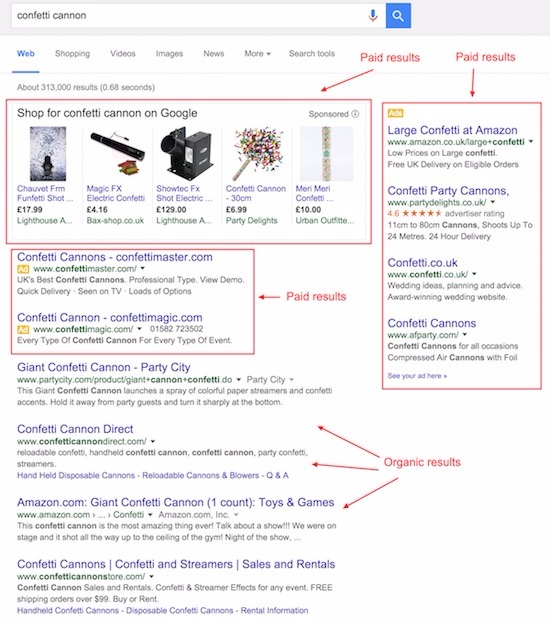
search for confetti cannon showing organic and paid results

Paid search is also a large part of search engine marketing. You can read more about this in our recent beginner’s guide to paid search and PPC.

Why do you need SEO?

Building a strong site architecture and providing clear navigation will help search engines index your site quickly and easily. This will also, more importantly, provide visitors with a good experience of using your site and encourage repeat visits. It’s worth considering that Google is increasingly paying attention to user experience.

When it comes to how much traffic is driven by search engines to your website, the percentage is substantial, and perhaps the clearest indicator of the importance of SEO.

In 2014, Conductor suggested 64% of all web traffic comes from organic search, compared to 2% from social, 6% from paid search, 12% direct and 15% from other referral sources.

This tallies with our own data, with approximately 70-75% of SEW traffic coming from organic.

Of all organic traffic, in 2015 it was found that Google accounts for more than 90% of global organic search traffic. So obviously you need a strong presence on Google SERPs, but how strong?

Well, according to this study from Advanced Web Ranking (which I’ve trotted out before when discussing how to dominate Google) shows that on the first SERP, the top five results account for 67.60% of all clicks and the results from six to 10 account for only 3.73%.
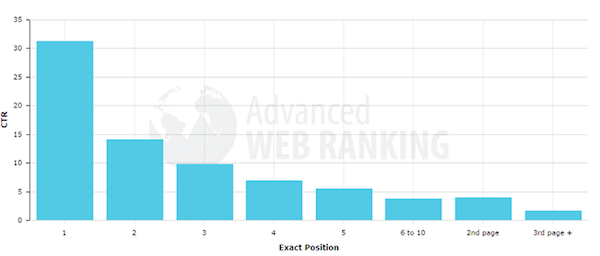
ranking positions chart

It’s therefore vital that your site appears in the top five results.

How are you going to achieve this? With the following tips, which I’ve split into two categories: what search engines are looking for and… drum roll… what they’re not looking for.

What are search engines looking for?

1) Relevancy

Search engines try to provide the most relevant results to a searcher’s query, whether it’s a simple answer to the question “how old is Ryan Gosling?” (the answer of which Google will likely provide without you having to leave the SERP) to more complicated queries such as “what is the best steak restaurant nearest to me?”
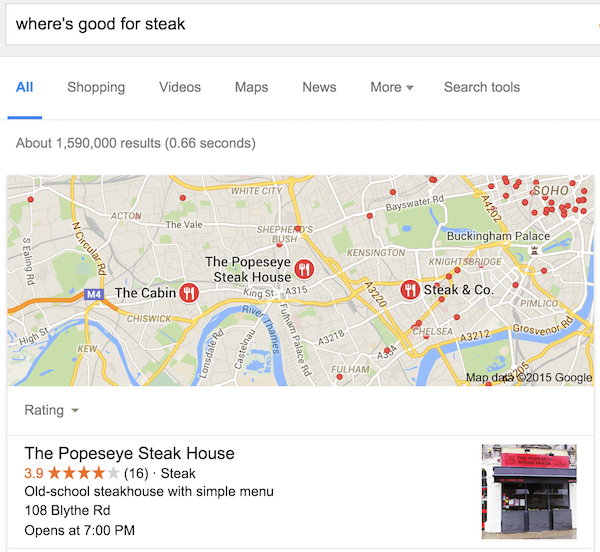
where's good for steak search

How search engines provide these results is down to their own internal algorithms, which we’ll probably never truly determine, but there are factors that you can be certain will influence these results and they’re all based around relevancy… For instance: a searcher’s location, their search history, time of day/year, etc.

2) The quality of you content

Do you regularly publish helpful, useful articles, videos or other types of media that are popular and well produced? Do you write for actual human beings rather than the search engine itself? Well, you should. Latest research from Searchmetrics on ranking factors indicates that Google is moving further towards longer-form content that understands a visitor’s intention as a whole, instead of using keywords based on popular search queries to create content.

Basically, stop worrying about keywords and focus on the user experience.

3) User experience

There are many SEO benefits for providing the best possible user experience. You need an easily navigable, clearly searchable site with relevant internal linking and related content. All the stuff that keeps visitors on your webpage and hungry to explore further.

4) Site speed

How quickly your webpages load is increasingly becoming a differentiator for search engines. Google may soon start labelling results that are hosted on Accelerated Mobile Page (AMP) so this may possibly be the ‘mobilegeddon’ of 2016. Speaking of which…

5) Cross-device compatibility

Is your website and its content equally optimised for any given screen size or device? Bear in mind that Google has stated that responsive design is its preferred method of mobile optimisation.

6) Internal linking

We’ve talked about the benefits of ensuring your site has clear and easy-to-use navigation, but there’s also a practice that editors and writers can carry out when publishing articles to help push traffic around the site and that may lead to higher trust signals for Google: internal linking. (See what we did there.)

Internal linking has many advantages:

  • It provides your audience with further reading options. As long as they’re relevant and you use clear anchor text (the clickable highlighted words in any give link). This can help reduce your bounce rates.
  • It helps to improve your ranking for certain keywords. If we want this article to rank for the term ’SEO basics’ then we can begin linking to it from other posts using variations of similar anchor text. This tells Google that this post is relevant to people searching for ‘SEO basics’. Some experts recommend varying your anchor text pointing to the same page as Google may see multiple identical uses as ‘suspicious’.
  • It helps Google crawl and index your site. Those little Googlebots that are sent out to fetch new information on your site will have a better idea of how useful and trustworthy your content is, the more they crawl your internal links.

7) Authority

An authority website is a site that is trusted by its users, the industry it operates in, other websites and search engines. Traditionally a link from an authority website is very valuable, as it’s seen as a vote of confidence. The more of these you have, and the higher quality content you produce, the more likely your own site will become an authority too.

However as the aforementioned Searchmetrics research suggests, year-on-year correlations between backlinks and rankings are decreasing, so perhaps over time ‘links’ may not be as important to SEO as we once thought.

There’s a good argument raging in the comments to this recent piece on links as a marketing KPI, which offers some diverse views on the subject.

8) Meta descriptions

Having a meta description won’t necessarily improve your ranking on the SERP, but it is something you should definitely use before publishing an article as it can help increase your chances of a searcher clicking on your result.

The meta description is the short paragraph of text that appears under your page’s URL in the search results, it’s also something you should have complete control of in your CMS.

Here it is in WordPress:

meta description in wordpress

Write succinctly (under 156 characters is good), clearly and make sure it’s relevant to your headline and the content of the article itself.

9) Schema markup

You can make your search results appear more attractive by adding Schema markup to the HTML of your pages. This can help turn your search results into a rich media playground, adding star-ratings, customer ratings, images, and various other bits of helpful info…
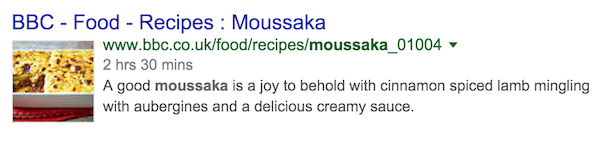
schema markup for recipe

Schema is also the preferred method of markup by most search engines including Google, and it’s fairly straightforward to use. For more information, check out our handy guide to Schema.

10) Properly tagged images

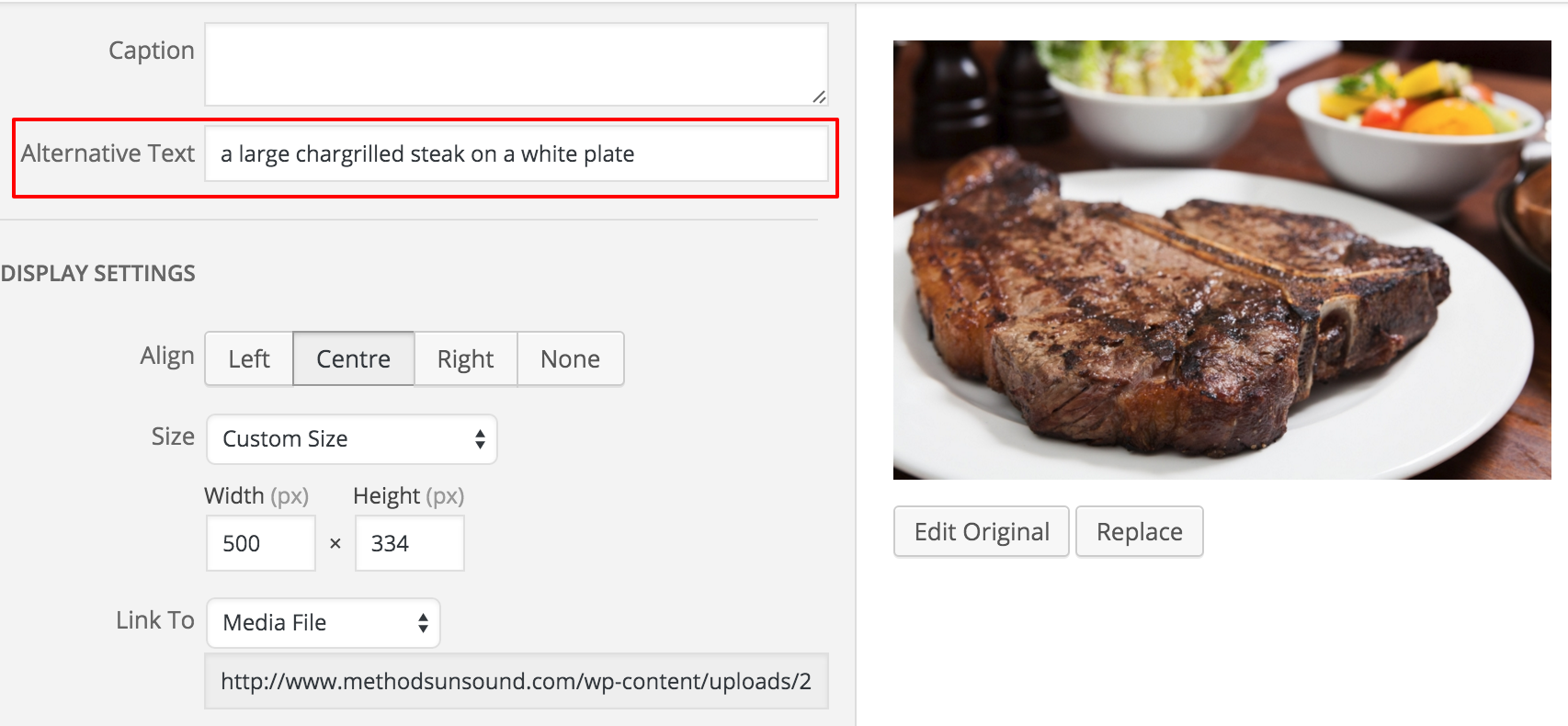
Many people forget to include the alt attribute when they upload images to their content, but this is definitely something you shouldn’t overlook because Google cannot ‘see’ your images, but can ‘read’ the alt text.

By describing your image in the alt text as accurately as possible it will increase the chances of your images appearing in Google Image search.
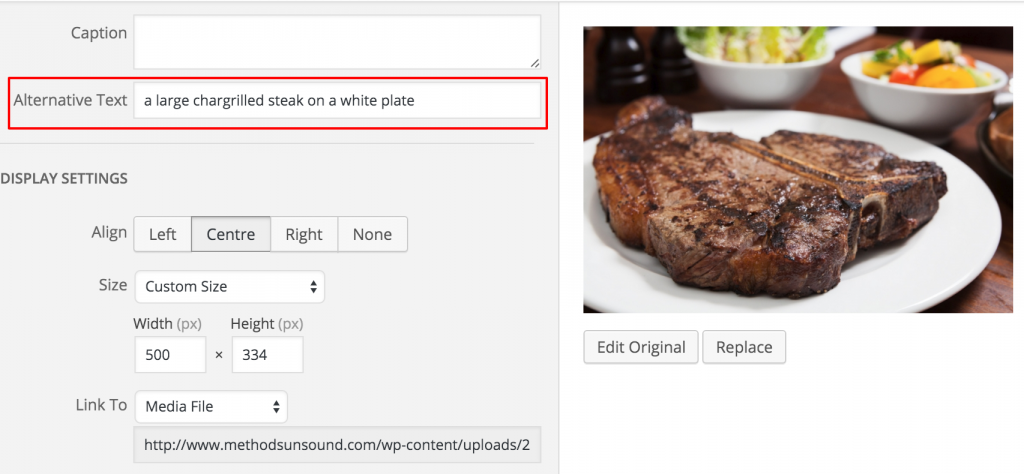
alt-text example in wordpress

It will also improve the accessibility of your site for people using ‘image reader’ software.

11) Evergreen content

Instead of peppering the internet with a rash of ‘quick win’ news stories with little insight, why not publish more evergreen content.

More thoughtful, helpful and practical-advice based articles can lead to huge long-term wins in terms of driving traffic and occupying highly visible positions in the SERPs.

Here’s a guide to planning and creating evergreen content.

12) Domain names

You should use sub-directory root domains (searchenginewatch.com/category/seo) instead of sub-domains (searchenginewatch.category.seo.com) as this is better for your overall site architecture.

You should also stay away from hyphens (search-engine-watch.com) and alternative Top-level domain names (.biz .name .info) as these are considered spammy.

Having a ‘keyword rich’ domain name may lead to closer scrutiny from Google. According to Moz, Google has “de-prioritized sites with keyword-rich domains that aren’t otherwise high-quality. Having a keyword in your domain can still be beneficial, but it can also lead to closer scrutiny and a possible negative ranking effect from search engines—so tread carefully.”

Also you should make sure that if you operate a site without the www. prefix, someone who types in www.example.com will still be redirected to your site. If this isn’t happening, Google may assume these are two different sites and your visibility could be compromised.

13) Headlines and permalinks

The headlines for your articles should be under 55 characters to ensure their complete visibility in SERPs. Make sure they’re snappy, attractive and as descriptive as possible (this is often an impossible balance). Just stay away from clickbait headlines, do not promise something that the content doesn’t deliver.

The permalink (which you can normally alter in your CMS even after it’s been automatically set) doesn’t necessarily have to match the headline exactly. Google has stated that you can use three to four key words that you should put the most important keywords first.

14) Comments

Do not turn off your comments system. Having a thriving community of regular commenters engaging in dialogue under your posts shows that visitors care enough about your content to either make their own relevant points or to praise it or to ruthlessly eviscerate it. Either way, at least people are reading it.

Just be super-mindful about filtering out spam comments, or immediately removing any that slip through. It’s also worth adding the nofollow value to your comments section so Google ignores any erroneous links that may appear.

15) Local SEO

Increasingly Google is serving results to users based on their location. This is particularly important to businesses out there in the real world who ned to catch a searcher’s attention just at the right moment, i.e. while walking down the street, on their mobile and looking for somewhere to eat.

You should register with Google My Business and ensure that all of your information is accurate and up-to-date, such as opening times, contact information, customer reviews and that your categorised correctly.

16) Social

The most obvious way that you can raise your site’s visibility through non-technical SEO means is of course through social media marketing.

You need to make sure you’re present on all relevant social channels (wherever your audience may be), and not just broadcasting your content in a faceless manner, but by using it as a customer service channel and genuinely interacting with people in a friendly, helpful and entertaining manner.

The actual correlation between social signals and search rankings is a much argued over subject, but here’s a good overview of the subject.

What are search engines NOT looking for?

There are many ‘black hat’ practices that can bring the full weight of a Google penalty down on your site, so it’s best to avoid doing the following, even if it looks like a brilliant easy win at the time.

17) Keyword stuffing

Overusing keywords on your pages, especially when they obviously affect the readability of your site. It’s debatable whether Google even still uses keywords as a ranking factor anymore.

18) Link buying or excessive link exchanging

Thinking of approaching a link farm? Just don’t do it. It’s not even worth it. The most valuable links to your site are the ones that come from authority sites within your own niche.

19) Annoying ads

Anything overly intrusive that destroys the pleasure of reading your content and slows down your site speed.

20) Mobile app interstitials

If you present mobile visitors with a full-screen advert to download your app, Google will consider you no longer mobile friendly.
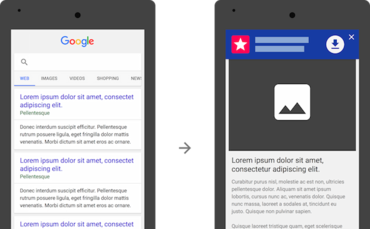
app ad interstitials

21) Duplicated content

If Google finds two identical pieces of content, whether on your own site, or on another you’re not even aware of, it will only index one of those pages. You should be aware of scraper sites, stealing your content automatically and republishing as your own. Here’s Graham Charlton’s thorough investigation on what to if your content ends up working better for somebody else.

22) Hidden text and links

There are a ways to manipulate rankings that a user may not ever see, but Google will probably find and punish you for.

Stay away from using white text on a white background, positioning text off-screen, setting font size to zero or hiding a link in a single character like a comma or a full-stop.

The temptation to put a link in that last full stop was incredibly high.

Right, on that note, I’ll finish up. Clearly this isn’t everything that you can do to help your initial SEO efforts, but it’s a good grounding at least

Please let me know if I’ve missed anything vital or just got something plain wrong…


The article SEO basics: 22 essentials you need for optimizing your site was first seen from https://searchenginewatch.com

5 Reasons to “SEO the Past” and a 4 Steps to Get You There

The majority of experts and companies that give content advice to new and upcoming businesses focus on establishing “new content” and “new strategies, ” but there is also something coined by HubSpot as “historical optimization,” which in other words refers to how to “SEO the past.” Historical optimization is all about updating content that you have already created and posted to your blog. By doing this you can not only impact your SEO, but also generate more traffic and leads in the process.

Why It’s a Good Idea to “SEO” Your Past Content

There is likely a lot of good content that you have already posted and has not been viewed in a while that could be put to much better use. Historical optimization allows you to reinvent, update, and reconstruct blog posts that you have already written. There are quite few reasons this might be a good strategy to incorporate in your existing SEO plan including:

You can update ANY information no longer relevant.

Has something changed? Do you wish you could update new information or ideas on a topic you wrote about a while ago? By using this strategy you can ensure that everything you have ever posted still holds true today. By updating your content with relevant and up-to-date information, you are sending a message to search engine bots that there is something new to consider, but you are also staying relevant for your readers, allowing them to visit older pages of yours and still finding the most accurate information.

You can look to improve conversion rates on older posts.

Did you have a blog post which got a lot of traffic but did not convert well? Using analytics, you can easily identify which of the content you have already posted were your top lead generators, therefore, using this same (but opposite strategy) you can also identify which posts were your worst lead generators. By also looking at your “historical” traffic data, you can look to see which posts were generating a lot of traffic but had low conversion rates. These posts provide an opportunity, if you take them as a sign that they were eye-catching in some way (in order to generate that traffic in the first place) then by finding ways to tweak and update them, perhaps by looking at posts that had your highest conversion rates and modeling after them, you can easily improve your conversion rates on these posts.

You can find historical traffic data by simply navigating to your Analytics like always and changing the date. Unfortunately you won’t have all of your data since the beginning of time, but this is a good place to start. You can start to record your data in a spreadsheet so that you’ll have older data in the future.

On the flip side, you can get more traffic on high converting posts.

You may also find that some of your older blog posts have quite the opposite situation. In other words, they may have been high-converting posts, but they did not get the traffic that some of your other posts had. By applying the opposite strategy and looking to improve traffic on these posts by making some alterations, you can get these particular blog posts to rank higher and ultimately improve their SEO.

There is no reason to let existing content go to waste.

According to HubSpot, we now have a “content overload” problem. Because developing and publishing content is becoming a lot more important for visibility and back linking purposes (and ultimately SEO purposes), more businesses are creating content everyday. Check out the graph below that they cite on their blog:

content-graphic

They suggested that while blog content available (as depicted in the graph) has grown, Forrester’s data suggests that an estimated 50% of business blog content is going completely unused. The moral of the story: It is simply not sufficient to continuously develop new content without improving and making use of what already exists on your site.

It is pretty clear that this is definitely untapped potential that can lead to more leads, more traffic, and higher rankings. Making use of content you have already published provides an unseen opportunity to improve your site all together and deliver more value to your readers.

The first step really is to look at your analytics and see what posts did well and which did not, as discussed above, but that is not enough. You also need to figure out the reasons they did or didn’t do well. In the break down I gave above I mentioned two scenarios with traffic and conversion. By finding out which of your content had high traffic or high conversion (or, conversely, low traffic, and low conversion), then you can make a game plan for creative ways that you can optimize those posts and “SEO the past.” Below I’m going to walk you through 3 examples of how you can do this in a creative way.

How-To SEO the Past: Make Creative Changes and Republish Old Content

If there is anything I have made pretty clear in this post, it is that you cannot neglect your old content. There are definitely posts you have developed which could do much better if you made changes and republished them. Google rewards newer “fresher” content, which is why when you see a high-ranking post on a search result it may only be minutes old.

In the example below I did a search for “Martian Luther King Jr. Day,” which with its historical legacy likely has a lot of content, or a lot of “older” content to reference and rank higher. However, Google chose to favor posts that provided the most up-to-date information with the approaching holiday. This is a good illustration of why Google preferences “fresh” and updated content over content that may have had more traffic and views over time, historically.

MLK

One of the ways you can be in Google’s good graces and get older content to rank and be considered in search results again is by updating and republishing your content. Below are some suggestions on how to make changes and republish in a creative way:

  1. Choose the blogs you want to update.

As I mentioned before, you are going to have to do a little footwork to see what posts are worth working with again by looking at your analytics. You don’t want to choose posts that totally tanked and were not successful at all, but rather, content that could be improved in one way or another (traffic, conversion, linking, updating time sensitive information, repurposing content in a visual way, etc.). Here are a couple of questions you can ask to get the creative juices flowing:

  • What did this post do well? What could be improved?
  • Have I displayed the information in the most captivating way possible? Does it make good use of visual elements?
  • Does it have an eye-catching or a sensible title that explains the topic clearly?
  • How would I view this post as a reader?
  • Is the post up-to-date? If information is time-sensitive, how can I creatively present something from the past (possibly an event or something that has already happened)?
  • What is Google looking for and how can I make this content fresh again?
  1. Define your approach.

The reason you find for selecting the posts you want to update is going to define what it is you are going to change or strive to improve. Make sure that you are making substantial effort to change and refine the post as much as possible, so that it is worth it to republish it.

  1. Focus on SEO and conversion.

This is really what this post is all about right? You want to put improving both your conversion and your SEO as a top priority. Do everything you can to keyword optimize, link build, and improve CTA’s (calls to action). This is where you can get creative and really aim to improve the content in substantial ways that are going to make an impact.

  1. Feature the post as “new” content.

Once you go through these steps, you are going to want to publish your updated post as new by changing the publish date so it’s featured as a brand new post on your blog. Then you are going to want to promote your updated content just like you would any brand new post—use your email marketing to reach out to your blog subscribers, post to social media, and utilize any other channels that work for promoting your content. You may want to consider even announcing the content is new if it was well read by your readers before.

update

The Takeaway

Improving your content does not always mean developing something new. Sometimes there are great pieces of content that can be reworked or reshaped in creative ways and can ultimately become more successful than they were when you first released them. It is really all about looking and defining opportunity and trying to approach the task in fresh creative ways. If you take this approach, Google and other search engines are likely to reward you for your efforts.


The post http://www.highervisibility.com/5-reasons-to-seo-the-past-and-a-4-steps-to-get-you-there/ appeared first on http://www.highervisibility.com

Google shows personal data within search results, tests ‘recent purchases’ feature

Earlier today, while signed in to Gmail, I stumbled upon what appears to be a new test from Google. Some say it’s a little bit creepy. I think it’s the natural evolution of Google Now.

I typed in ‘capsule’ to take a look at the CRM tool, and Google served up the following personalised content unit:

capsule image

As you can see, I’ve been buying coffee capsules recently.

Before this content was shown to me it displayed a message along the lines of “only you will see this result”.

The data is presumably pulled in via Gmail (most likely) or possibly even Chrome (though Matt Cutts once said Chrome data was never used in the organic algorithm).

Ok, let’s try another recent purchase…

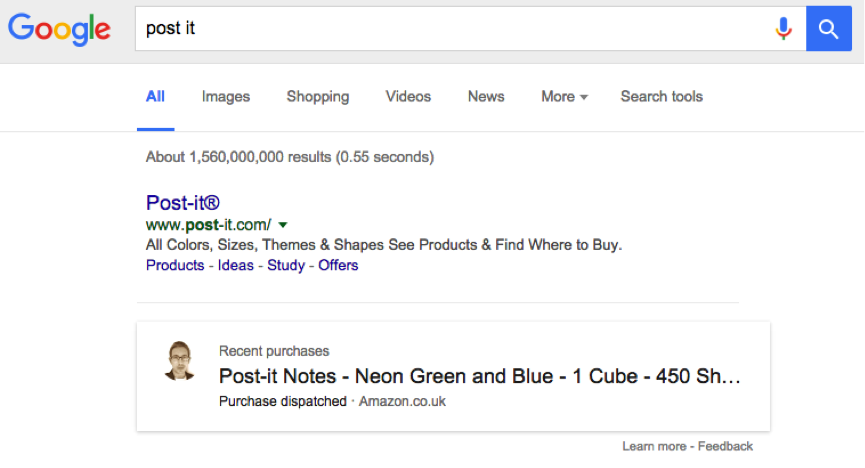
post-it notes search

Well, there it is. A slightly different format this time, but I am indeed guilty of buying multicoloured Post-It Notes.

I clicked the ‘Learn More’ link, to find out what was going on, and was taken to a page called ‘Search results from your Google products’.

Google explains:

“You can search for information from other Google products you use, like Gmail, Google Calendar, and Google+. For example, you can search for information about your upcoming flights, restaurant reservations, or appointments.”

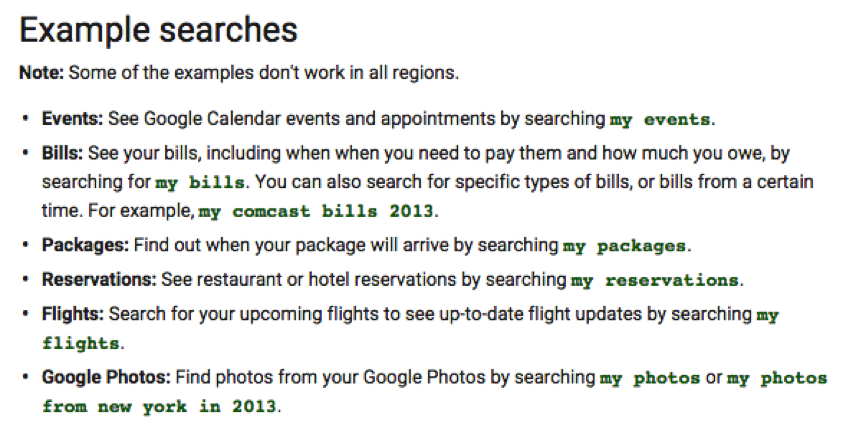
Here are some other example searches that it suggests:

example searches

Intriguing. I typed in ‘my packages’ (‘my purchases’ also works) and sure enough, it revealed what I had been buying recently. It even included a takeaway curry! Expand the result and it will give you the detail, and provide a link to the email receipt…

just eat results

A little research shows that the ‘my purchases’ operator has been in play for a year or so, but this is certainly the first time I’ve stumbled upon this feature based on a product keyword.

Google did a good job of finding the things I’d bought from Amazon, based on the keywords in the product name, but not so well from eBay and other vendors. Might be telling.

Or it could just be a slow rollout and I’m the last to get it…

Getting up close and personal

Google is turning the search interface into a personal ‘tell me about my X’ tool. Makes you think about its “organising the world’s information” mission statement. Now it’s specifically organising your own personal information.

It’s quite a thing to get your head around. I did a full-on double take when I first saw my purchase history in the search results.

I wonder how many millions of birthday presents are going to be prematurely revealed?

You have the ability to opt out, by changing your search settings (click ‘Do Not Use’ under the ‘Private Results’ heading), and it should only work if you’re logged in.

Google Now

This clearly seems to be an extension of Google Now, which is billed as an “intelligent personal assistant” and has one of the most ironic websites ever (it should be called Google Eventually).

I know that Google Now works with the Chrome browser but it’s the first time I’ve personally seen anything like this integrated into the search results interface.

As such, I checked to see if it works in Safari, and sure enough, it does.

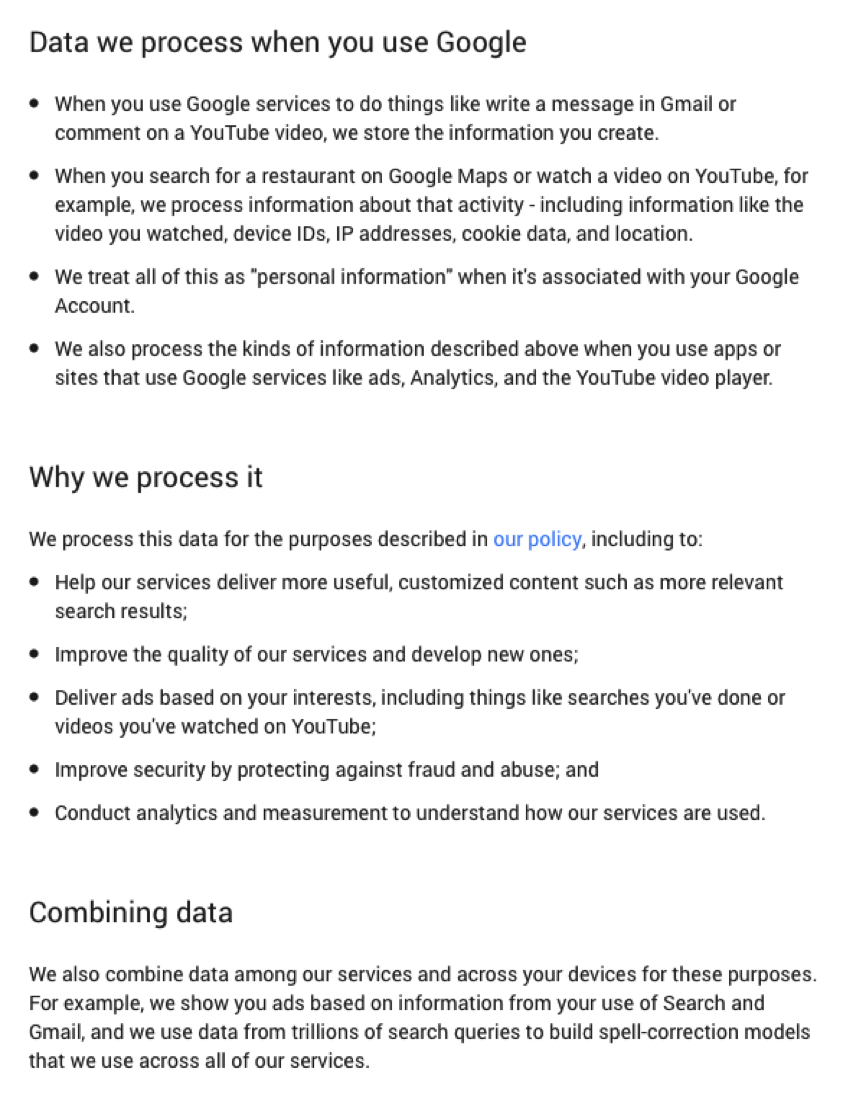
When signing in to Google via Safari I was presented with some updated T&Cs, which covers how it uses data…

google t&cs

All very interesting. Especially that last sentence about combining data. It’s pretty much why I think Google (sorry, ‘Alphabet’) should buy Twitter, as it makes a lot of sense from a data perspective.

What do you think? Creepy or useful? Fancy a cup of coffee?


The article Google shows personal data within search results, tests ‘recent purchases’ feature was first seen from https://searchenginewatch.com