Tuesday, 26 April 2016

How to optimise your page images to increase site speed

Google’s official slogan is “Don’t Be Evil”, but it’s long been rumoured that the company has a second, internal motto that they tend to keep under wraps:

“You’re either fast, or you’re f***ed.”

We’ve written about site-speed in the past, and there’s no doubt of its importance (if there is, stick around for the stats section of this post) but for content marketers, improving the speed of your website is often seen as a particularly arduous technical exercise that’s completely out of your control. Only a back-end full-stack engineer can speed things up significantly, right?

As it turns out, nothing could be further from the truth. As Tom Bennet from Builtvisible explained in his excellent recent talk at Brighton SEO. Here, I’ll run through some key points Tom addressed to show how and why you should concentrate on delivering a lightning-fast experience to users.

Why is site speed important?

Now, I mentioned stats didn’t I?

According to the official Google webmaster blog, site speed matters. Google itself spends an awful lot of time checking whether or not your site is keeping up with your competitors. If you are slower, then your place in the search results will suffer.

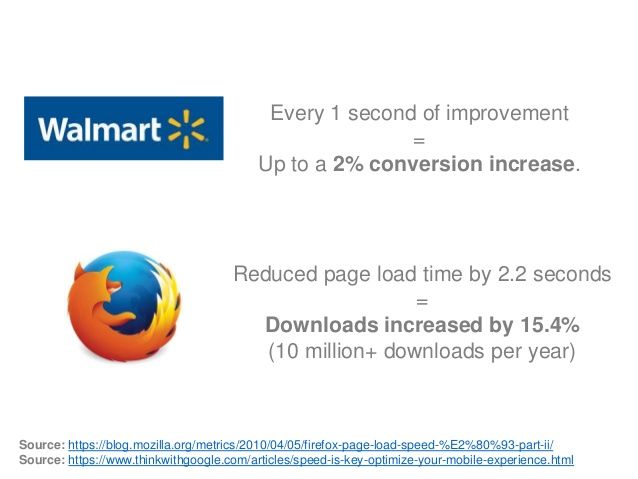
But that’s not the only important factor here. Site speed improves the overall User Experience. As a case in point, Tom mentioned this extraordinary stat from Firefox:
brighton-seo-site-speed-for-content-marketers

When Firefox increased average page load time by 2.2 seconds, form downloads increased by 15.4%. That equates to more than 10 million downloads per year.

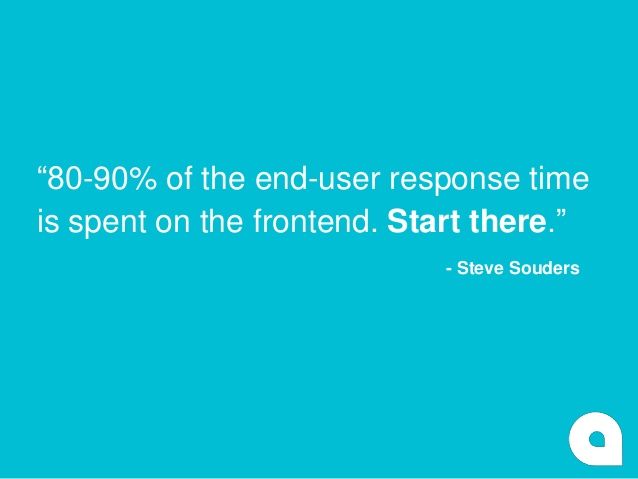
Once you hear figures like that, the value starts to become clear. Tom also took time to quote Steve Souder, a pioneer of much modern web performance work:
brighton-seo-site-speed-for-content-marketers-Steve-Souders

So, we know we can do something about it. But where to concentrate our efforts?

What can we do about it?

To illustrate, Tom built a simple, fairly standard content page using bootstrap and jQuery. The content marketing industry churns out thousands of these every day, so it should be fairly relevant:

brighton-seo-site-speed-for-content-marketers

Next, we fire up the page and measure it using a combination of Yahoo’s Yslow and Google PageSpeed rulesets. Here are the initial results:

brighton-seo-site-speed-for-content-marketers

Taht F Grade is going to seriously hurt our credibility in Google’s eyes, and 3.9 seconds is going to seem like a grind for users. If you don’t believe me, count slowly to four. Would you be willing to wait that long for every page on a site to open?

But where should marketers focus their efforts to have the most impact?

On a typical page like this, images are by far the largest and most common element, so this is where we should be concentrating to start with.

brighton-seo-site-speed-for-content-marketers

Now, this isn’t just a case of opening up your images in Photoshop and making them smaller. Resolution does matter (we still want our pages to look beautiful), but only up to a certain point, so the first step is to check our image sizes:

brighton-seo-site-speed-for-content-marketers

As you can see from the page element, this image has been uploaded at 1024 x 683 pixels, but the user will only ever see it at a maximum of 420 x 289, less than half the upload size.

As always, it’s important to consider the User Experience, so let’s ask ourselves a few questions:

  • What formats should we be using for images? PNGs are great for images with fewer colours or transparencies, while PEGS are perfect for photos.
  • Dimensions: what is the maximum width and height at which the image will be displayed?
  • Finally, do you really need all of those images?

If you have text within an image, get rid of it and use an actual font instead, and use vector graphics or CSS for things like logos or shading on the page. As Tom put it

 “The fastest HTTP request is the one not made.”

Google has a range of guidelines and advice on this available which you should check out.

So, Tom resized, reformatted or replaced his images. How did this affect the overall site speed?

brighton-seo-site-speed-for-content-marketers

Being diligent with images was enough to shave a whopping 1.2 seconds – or 30% – off of the total page load time.

It’s still not rocketspeed at this point, but it’s much, much better. Tom detailed several other useful tips during his presentation which I will try to cover in the future as well, but for now – time to tighten up those images.


The article How to optimise your page images to increase site speed was first seen from https://searchenginewatch.com


Monday, 25 April 2016

Smarter digital assistants and the future of search

It’s search Jim, but not as we know it.

The dream of an ultimate personal assistant isn’t a farfetched sci-fi fantasy like the interactive computing systems in Star Trek. It’s technology available today already being applied to search engines.

Enterprise-E_LCARS

Leading visionaries in search technology, including Google’s Beshad Behzadi in his keynote speech at the SMX West Keynote to Satya Nadella at Microsoft’s Build conference, are articulating a vision of smarter and more capable personalized help that will drive efficiency, focus and ultimately, happiness.

Nadella believes the next big bet for Microsoft is “conversation as a platform.” This is a more intuitive and accessible canvass integrating into apps, as well as artificial intelligence (A.I.) and bots that can interact with other bots. While the devices and technology used to access search are evolving, search will still be an increasingly integral part of everyday life.

Understanding intent through voice search

Today’s digital assistants like Microsoft’s Cortana, Apple’s Siri and Google Now are voice-search enabled and growing smarter with every interaction. According to comScore, 50% of all searches will be voice searches by 2020.

Since voice search is more conversational and uses natural language, the A.I. is evolving to understand user intent and context based on the previous search queries, multiple step queries and user behavior.

google-voice-search

Words can provide invaluable substance to A.I. technology during the search process. For marketers, the longer query strings from voice search as compared to text provide richer user intent data. While a text query would typically be one to three words, a spoken query is often three or more.

For example, on my desktop I would search for “blue t-shirt.” But when it comes to a voice query, I might ask, “Hey Cortana, where can I find a cool blue t-shirt?” The conversational tone provides a signal of intent to purchase, style preference and desired shopping locations if I granted access to my location. It permits marketers to:

  • Build user-intent models to understand where the user is in the customer journey.
  • Match advertising campaigns (messaging and landing pages) to the right stage of user intent.
  • Develop site content with a conversational tone, providing specific answers to users’ needs and top questions. Voice searchers are looking for quick answers. Content answering specific questions will make your site a go-to resource.

AI, the ‘Added Ingredient’ for enhanced consumer experience and engagement

Technology giants like Microsoft, IBM and Google are focusing on new ways machine-based learning, A.I. and bots can analyze data. Personal assistants like Cortana, powered by Bing search intelligence, can request permission to gather data from email accounts, calendars, social networks, geo-locations and mobile apps to start learning about behaviors and preferences.

The A.I. engine analyzes the information to make recommendations before they have a chance to ask a question. The more interactions a user has with their assistant, the more accurate the predictive models can be – and the more her serendipitous proposals will delight us and make life easier.

A screenshot of a conversation with Siri in which the user (our editor Christopher Ratcliff) tells Siri "Open the pod bay doors HAL", a reference to the film 2001: A Space Odyssey. Siri wearily replies, "Oh, not again."

For many, the end of the day reads like a frustrating laundry list of stuff that still needs to get done – including the laundry! Efficiency is now one of the keys to happiness, and technology give us back time to be in the moment.

If I give my personal assistant access to the locations that are important to me and my calendars, she can send reminders when I need to leave to make it on time to my next appointment.

The predictive component A.I. can monitor traffic and figure out if I need to leave work now to pick my son up from day care because of a freeway accident.

It can deep link into apps, such as Waze, and suggest the best alternative routes based on current road conditions.

Soon, this intelligence will integrate into shared intelligence across A.I. bots, and tasks such as renewing your driver’s license will be done on my behalf and save me time.

For marketers, it’s important to understand and adapt to this new technology to build immersive customer experiences. As deep-linking and intelligent agents are integrated into apps and products, consumer engagement with brands will reach the next evolution. This means there is more potential than ever to influence the path to purchase in the customer journey.

duer

While “Beam me up Scotty” and journeys to the final frontier are not yet a reality for most of us, the capabilities and technology for building the ultimate digital assistant are almost here.

This new “other” way to get things done will make it more appealing for consumers to share personal data so that assistants can become more predictive and take actions on our behalf.

We’ll continue to use search, websites, and apps. But how we interact with them will provide more intent and context for A.I.s and bots to help us get things done in our daily lives. This way we can focus and be fully present in the moments that matter the most.

Steve Sirich is GM Marketing, Bing Ads, Microsoft and a contributor to Search Engine Watch. 

For lots more information, download our Marketer’s Guide to Artificial Intelligence report, which takes a look at how AI can be used for marketing, now and in the future.


The article Smarter digital assistants and the future of search was first seen from https://searchenginewatch.com

What are featured snippets and how do I get them?

Rob Bucci, the CEO of STAT, delivered a fascinating talk at BrightonSEO last week about the mystery of featured snippets, using his observations after analysing one million queries.

Here’s a round-up of the talk, featuring Rob’s advice on why featured snippets are important and how to increase your chances of obtaining them.

What is a featured snippet?

A featured snippet is a summary of an answer to a user’s query, which is displayed on top of Google search results. It’s extracted from a webpage, and includes the page’s title and URL.

Screen Shot 2016-04-25 at 10.49.35

There are three types of snippets, depending on the query:

  • Paragraph
  • List
  • Table

According to Rob Bucci and STAT, paragraph snippets are the most common, occupying 82% of the featured snippets, with list snippets appearing in 10.8% of the results and table snippets in 7.3%.

Screen Shot 2016-04-25 at 10.38.27

Why are featured snippets so important?

Featured snippets offer various benefits for any site that can use them effectively.

1. Maximum authority

By obtaining a featured snippet you prove that Google chose your page over others as the most useful one to users’ relevant queries.

2. Beating the competition

When Google chooses your site to be the quick answer to a specific question, the result is displayed above the organic results, which means that you beat the competition, including a site that may rank #1 for the particular search result.

3. Increase of traffic

Users like featured snippets as they provide quick answers to their questions and this benefits the chosen site with an increase in traffic, which could be upwards of 20-30%.

Screen Shot 2016-04-25 at 12.35.54

How to earn a featured snippet

During his talk Rob Bucci offered practical advice regarding featured snippets and how to get them. Here are his basic steps that can bring you closer…

1. Analyse keyword opportunities

Use the right tools to start searching for keywords to target. Find the right keyword opportunity that could be ideal for your site.

2. Create new strategic content targeted at snippets

It’s a good idea to create new content while keeping featured snippets in mind, but it’s important that it doesn’t result in unnatural content. Always take into consideration user experience and use ideas that make sense to your vertical.

Screen Shot 2016-04-25 at 10.46.42

3. Bring in Q&A formatting

Devote a complete page to a single question, if possible, and find a way to incorporate FAQ into content.

4. Make it easier for Google with subheadings, lists, tables, etc

Screen Shot 2016-04-25 at 12.45.04

Help Google discover your content with basic on-page optimisation techniques.

5. Polish existing snippets for higher CTR

If you have existing snippets, then evaluate and edit them from time to time to ensure a constant traffic back to your site.

Featured snippets in numbers

STAT analysed one million high-CPC queries for its latest study, in order to take a deep dive into featured snippets and here are the most interesting stats to consider:

  • Out of the one million queries that STAT analysed, 9.28% of them contained snippets
  • More than 70% of the featured snippets didn’t come from the very first organic result

Screen Shot 2016-04-25 at 10.38.49

  • Featured snippets appear with an image 27.58% of the time.

Screen Shot 2016-04-25 at 12.36.49

  • Keywords with high search volume show featured snippets twice as often.

Screen Shot 2016-04-25 at 10.42.49

  • Higher query word counts result in featured snippets more often.

Screen Shot 2016-04-25 at 10.43.12

  • Featured snippet URLs score slightly better on readability tests
  • Featured snippets had a 12.5% higher than average social share count (by examining Facebook, LinkedIn, and Pinterest)

Screen Shot 2016-04-25 at 10.45.14

Takeaway

You don’t have to come first in search to increase your authority and drive traffic to your site, provided that you start creating strategic content that may lead to well-earned featured snippets.


The article What are featured snippets and how do I get them? was first seen from https://searchenginewatch.com

Five useful ways to create content for service and product pages

Content development knows no bounds!

As you’re likely aware, every bit of your website or blog needs content development at one point or another. However, I find that many people get stuck when it comes to developing content for their business’s service and product pages.

It’s easy to get creative when writing a blog or creating a guest blogging strategy, but product and service pages can scare people off. We end up seeing pages full of boring, traditional text because the content on those pages may has been deemed “unimportant.”

It’s true that that this is a place where you might need to be more creative and you need to invent your own ways and ideas to produce content. But the good news is that if you do, product pages have an even better chance of ranking highly and getting more traffic as landing pages.

So, if you need some help figuring out how to invent new ways to create content for these pages, check out some of the ideas below.

Ask: what do people want to know about our products and services?

When you are stuck trying to develop content, a good starting place is to ask what it is exactly that your audience wants to know. After all, your products and services should act as a solution to their needs. Yet, do not leave your products and services as stand-alone documents, answer the questions that your customers are asking.

A really great way to do this is to have a creative Q & A section. You can either develop these questions (and answers) yourself based on what people ask you and your sales team the most, or you can actually turn to social media and emails where people have explicitly asked your product and service related questions.

In any case, developing content around this notion of product Q&A will show your ability to anticipate the needs of your customers, but it will also give you an interface that you can constantly update, change, and revise for fresh content.

Below is an example from QA Flooring Underlay Accessories:

product page

In the example above you can see that under the various product and services tabs they have designed a Q&A section for customers to review. This is a great way to give them the “so-what” and the “why” explanations about your product.

An interactive sales person: be conversational

There are so many ways that you can be innovative in presenting these pages as a space for an interactive sales experience.

According to CopyPress, your website should act as an online sales person – not just offering descriptions of products, but focused on sales and giving your audience plenty of reasons that people might want to buy from your site.

This idea is most important when developing summaries for each product or service. You definitely need to have one, but you have to do it right.

Your description really should be more of a “brief summary.” While it doesn’t need to be lengthy, it does need to provide some explanation as to why the customer should choose to buy it from you.

Descriptions of the product itself are not enough. Take this as an opportunity to provide some information to your client so that they are not left with questions hanging over their heads before purchase. Here are some things your summaries should tell:

  • Why the product or service is useful
  • Why they have a need for your product (that they hadn’t considered before)
  • Why your company is the best option

Remember that you don’t want to overwhelm them with information – being concise and considering careful integration with this kind of content is key. Use first-person language to help answer the questions above, but keep out all of the fluff.

Keep your content organized and then move on to other elements of the page.

Create a sense of urgency

Creating a sense of urgency with content on a product/service page is a balancing act. On the one hand, you don’t want a buyer to think that a product they fall in love with is going to go away out of the blue once they purchase; but on the other hand you don’t want them to wait to purchase your product or sign up for the service.

One of the ways you can create a sense of urgency is by making sure that you utilise content on these pages to send that message.

Develop content that is going to get visitors hooked and also feel the need to buy or sign-up ASAP. There are a variety of ways to do this: promotions, monthly offers, showcased products, all of which involve creatively developing content which can be updated on a regular basis!

The example below from Shoedazzle shows how they used a monthly offer to help keep visitors hooked with their content:

shoedazzle ad

Make content unique and capture attention

Since this is an opportunity for creative freedom and being innovative, push the limits with uniqueness.

Here are some ideas that you can make content more unique on these pages and also increase conversions:

  • Pay attention to aesthetics like layout, style, and color choices
  • Find ways to use appropriate images and video
  • Incorporate your brand and mission as often as possible
  • Utilize customer reviews to make a claim for success stories and satisfaction
  • Make customer reviews visual
  • Link to other related content on your site
  • Add a “suggested” section based on demographics and user interest

All of these points are becoming more commonplace on product and service pages, but it’s still a great way to offer your audience something more.

Take Just Fab for example. Their layout has different tabs you can click with different information, one tab being reviews. The layout is easy to understand and covers everything a customer would want to know without being overbearing:

just fab product page

Continue to brainstorm for new approaches

When you are trying to be innovative in developing your product and sales pages, it is always your best bet to turn to the people that know the product best.

Ask your employees the aspects of products they have to explain over and over again. Ask your regular customers what it is that they love about your product. Ask members of your local community why they choose to shop at your store (online or in-person) over others.

While there is not necessarily a one size fits all plan for creatively developing these pages, figuring out what your brand wants to say and how these pages need to tell your story boldly to new clients is one step of the equation.

Remember, doing this market research will be an opportunity for you to continuously develop and grow the content on these pages, and this in turn will help your SEO. Don’t miss out on the opportunity to make your service and product pages as appealing and interesting as they can be.

The takeaway

When you start with a question, “what do people want to know about our products and services?” you are making this effort customer-centered, and that is going to be apparent for those who land on your product pages.

Consider your site an interactive salesperson, where your job is to convince people through summaries (rather than boring old product descriptions) why your products are the ones they should choose.

You also need to create a sense of urgency, so that people feel just the right pressure to sign-up today rather than tomorrow.

In the end, you can do these things by making content unique and attempting to capture the attention of your audience from the very beginning. There are a lot of ways to do this, but beginning with brainstorming is just one way you can get the ball rolling!

Do you have experience developing your product and services pages with fresh content? Let us know in the comments section below.


The article Five useful ways to create content for service and product pages was first seen from https://searchenginewatch.com

Friday, 22 April 2016

Five of the most interesting SEM news stories of the week

Welcome to our weekly round-up of all the latest news and research from around the world of search marketing and beyond.

This week we have masses of stats and a surprising dearth of Google related news. Yes Google merely comprises 2/5 of this week’s stories. To make it for it next week, Google is planning on shutting down the internet until you nofollow all you ill-begotten links.

Half of all weekend searches are made from a mobile

Bing Ads has released insight into UK consumer behaviour on mobile devices, revealing that one in two searches over the weekend are now made from smartphones or tablets.

Data from search trends across the Bing Network last year has shown that retail sees the highest share of weekend mobile device searches (54%) with travel (48%) and finance (36%) rounding out the top three.

The number of questions asked on smartphones grew by more than 20% year-on-year. Searches asking ‘what’ have nearly doubled (+48%) and those asking ‘which’ are up by more than a third (+32%).

Under 35s account for more than half of smartphone queries (55%), whilst over 50s continue to dominate searches on tablets (40%).

Yeah I made you think it was all just from one mobile didn’t I? Apologies.

Google has officially killed toolbar PageRank

We knew this day was coming, mainly because we covered it more than a month ago, but as of last Friday PageRank has officially been removed from public and third-party eyes.

Google will still use the (admittedly massively outdated) signal internally, but for now it will be their little secret.

17% of enterprise marketers still don’t have a content strategy

As Chris Lake reported this week in CMI’s content marketing trends 2016, despite huge investment, only just over a third of marketers said that they had a documented content marketing strategy while the rest either didn’t have a strategy or one that was written down.

Screen Shot 2016-04-21 at 08.54.05

You can now search and listen to podcasts in Google Play

Rejoice users of Android in the US and Canada, Google Play has adapted the same technology it uses for its music service and launched contextual podcast playlists to make it easy for you to find the right podcast, for whatever the occasion, for whatever your mood.

Untitled-1 (1)

That occasion mainly being “I want a podcast that’s the same as Serial” and the mood being “I’m annoyed that this podcast isn’t as good as Serial.”

Spend on social advertising jumps 86%

Spend on social advertising made a sudden rise to 86% year-on-year in the Q1 2016, thanks to a 122% rise in mobile ad spend, according to the latest report from Kenshoo.

Growing spend on Instagram ads and Facebook Dynamic Product Ads helped drive total social spend in Q1, significantly higher than Q4 2015, going against the normal seasonal ad buying pattern.

In paid search advertising, much of the 13% YoY growth in spend during the quarter came from marketers investing 77% more on smartphone ads. They also spent 98% more on Product Listing Ads than in Q1 2015, generating three times more clicks than a year ago.


The article Five of the most interesting SEM news stories of the week was first seen from https://searchenginewatch.com

The dangers of Googlizing your site

By optimizing your website for Google, you could be sabotaging your site for Baidu in China and Yandex in Russia and Eastern Europe.

It is an undeniable fact that Google has the largest search market footprint in the world. As a result, there is an endless supply of resources and information about how to optimize search for Google. As such, I understand how important it is for website owners to make sure that their sites are optimized and perform well in Google search results.

However, by optimizing a site solely based on Google’s algorithm changes and abilities, you may actually be de-optimizing a site for other search engines. This de-optimization could devastate your site’s performance in some critical markets.

If a market like China is important to your business, you need to ensure that the changes you are making to improve Google performance also work well for a search engine like Baidu.

Baidu_screenshot_600

For Russia and some eastern European countries, it needs to work for Yandex.

Yandex Screenshot_600

There are many differences in SEO best practices among search engines including local regulations, domain, and hosting location. Below are some of the updates that you may have implemented or are planning to implement to your site that may ravage your organic search traffic from Baidu.

JavaScript and AJAX

Last year, Google confirmed it could crawl and index links and content within JavaScript and AJAX. This was of course great news to many website owners as it would help improve their site experiences.

Unfortunately, Baidu is not good at crawling and indexing content within JavaScript and AJAX, yet. Using JavaScript for site navigation kills traffic from Baidu immediately after a new site launch. In one example, we saw how shortly after a new site launch, the number of Chinese pages indexed by Baidu decreased from 86,300 pages to 174 pages.

In November last year, Yandex announced it would start to crawl JavaScript and AJAX, and warned site owners not to block their JavaScript and CSS files. However, just because Yandex can now crawl and index those links and content, doesn’t mean pages will start to show up higher in search results. Yandex measures the value of the pages based on not only the content, but also the incoming links and other statistical data.

Recommendation:

Where possible, do not use JavaScript and AJAX for navigation and content that need to be crawled and indexed by Baidu. If you still wish to use JavaScript and AJAX, create a separate Chinese site with static links in the navigation, and important content in HTML.

Yandex has created special mechanisms to give greater visibility in the search results for pages with JavaScript and AJAX.

Meta keywords, meta description and header tags

Content entered in the meta keywords, meta description and header tags might not be considered as important as it used to be for Google, but it still plays an important role in SEO for Baidu.

Google Meta Head_600

Recommendation:

Therefore, place meta keywords and meta description tags in the <Head> section on all pages. You can leave them blank for other country/language sites, but be sure to fill them out on Chinese pages. Also use <H1> ~ <H6> tags on pages. They may not help as much against Google, but they also won’t hurt. It’s best to use them in your webpage templates to help your Chinese pages.

Subdomain vs. sub-directory

While most performance tests show that segmenting the country or language using a subdirectory performs better for a site without a country code top-level domain, some international SEO experts still advocate the use of subdomains.

Google’s Webmaster Help Guide allows businesses to use either method. However, Baidu specifically suggests using subdirectories.

Recommendation:

If you wish your Chinese site to perform well in Baidu’s search results, you need to set your Chinese site as a sub-directory such as, “Yourdomain.com/cn/,” or “Yourdomain.com/zh-cn/and not as a subdomain such as, “cn.yourdomain.com.”

Content placement within the web page

Google and most major search engines have become really good at crawling and indexing entire pages of content.

However, Baidu is not as good as doing the job, yet. It is also known that when Baidu re-crawls pages that have been indexed before, it only crawls the first 1000 bytes or so of the content to see if it has new information. If it doesn’t find anything new, it stops indexing the rest of the page, and moves on to the next one.

Recommendation:

Always place important content (including keywords) at the beginning of the page. If you update any content in the bottom half of the page, submit the URLs of those pages to Baidu using Baidu’s Webmaster Tool for re-indexing.

Yandex also has its own Webmaster Tools, where you can review your web site performance, submit XML sitemaps, and take other actions to improve your website.

There are many other algorithmic differences between the Google, Baidu and Yandex search engines. If China and Eastern Europe are important markets for your business, make sure that you take balanced SEO strategies that work for all of your target search engines.


The article The dangers of ‘Googlizing’ your site was first seen from https://searchenginewatch.com

Thursday, 21 April 2016

Understanding our love of visual content

We are experiencing an omnipresent visual domination lately and it’s not expected to change any time soon. So what makes us love visual content?

Whether it’s an image, or a video, people prefer consuming information in a visual form, as it’s more appealing, which leads to an increased engagement. Human beings are naturally drawn to visual content and any type of it may enhance a post’s performance.

Types of visual content

Visual content is a broad term that includes many types of content and the main ones are:

  • Images (photography, quotes, memes, screenshots, GIFs, etc)
  • Infographics
  • Videos
  • Podcasts
  • Presentations
  • Data graphs

All of them can be very engaging and a mixed use of them can create an effective content marketing strategy, provided that they are used appropriately for each medium, always by taking the audience into consideration.

Appealing visual content

Visual marketing at the forefront of social media

Social media has significantly relied on visual content, as it manages to grab the users’ attention, while its varying types (eg. the rise of infographics, or the domination of videos) allow it to maintain its popularity.

It is estimated that 63% of social media is made up of images and we assume that this number will only increase in the next years (especially if we also add videos to it).

The psychology behind our love for visual content

Every popular social network could attribute its success to the right use of visual content and the way it is offered to the users, in order to create the right balance between words and visuals.

According to BuzzSumo, Facebook updates that include an image had 2.3x more engagement than those without one.

buzzsumo

Moreover, Buffer reported that tweets that contain images lead to 150% more retweets.

retweets buffer

Away from Facebook and Twitter, visual appeal has contributed to the rise of new platforms that exclusively rely on visual content, such as Instagram, Snapchat, Pinterest, Tumblr, etc.

All of them (almost exclusively) focus on images and videos and that’s what makes them so popular, with users loving the simplicity of adding content to them, while brands face the challenge of experimenting with new types of (visual) content to maintain and increase engagement.

Why do we prefer visual content?

The psychology behind our love for visual content

According to Jakob Nielsen, users only read 28% of words when visiting a website, with the trend of skimming rather than reading a text becoming prevalent in the online information overload.

Thus, visual content engages with a reader as fast as possible and in the most interesting way and that’s why publishers tend to rely on it even more every year.

The main reasons that we prefer visual content over plain text are:

  • It beats our short attention span
  • Its simplicity is tempting for any subject
  • It manages to engage with the reader and increase the time spent on content
  • It manages to communicate complex concepts in an appealing way
  • Its appeal increases the chances for the readers to share the content
  • It stimulates our minds, especially when it is linked with an emotion

Column Five has created an infographic on the power of visual communication and it presents three main reasons why we love visual content: Appeal, Comprehension, Retention.

visual content1

Appeal refers to the natural attraction towards visual content, and the way it succeeds even in a short attention span, comprehension is linked to the way our brain translates data to simplify them and retention is related to the memorable experience that visual content tends to create.

visual content3

How science proves our love for visual content

The psychology behind our love for visual content

It has been observed that 90% of the information sent to our brains is visual, with our brain responding to it 60,000 faster than it does for text.

Thus, our brains need a visual representation to process information faster and create a connection between the visual object and its concept. It’s impressive how the visual perception in our brain makes such a complex task easy and this could also be the scientific reason why an “image is worth a thousand words.”

The psychology behind our love for visual content

However, this is not an automatic process, as our brain still needs to rationalise the connection. Visual perception and the calculation of the surroundings rely on the person’s past experiences and memories that could be relevant to the exposure to the specific information.

According to neurobiologist Semir Zeki of the University of London,

“The brain has to actively construct or invent our visual world. Confronted with an overwhelming barrage of visual information, it must sort out relevant features and make snap judgments about what they mean.”

Scene perception, or else the perception of scene gist is the process that our brain performs to perceive the world, from the objects, to the connections they create to our brain, and Monica S. Castelhano and John M. Henderson proved in an experiment in 2008 how even the colours may affect the activation of a scene gist.

castelhano and henderson

Visual content may even become appealing in a way that we cannot explain and this is usually related to the emotions it may evoke.

The magic connection between visual content and emotions

The effectiveness of visual content can be further enhanced with the use of the right emotions.

A visual stimulation can create a visceral reaction by evoking a feeling that may even be subconscious, and that’s what makes it inexplicable to us when trying to understand what makes an image more appealing to us comparing to a similar one.

The psychology behind our love for visual content

Visceral reactions form the strongest connections on visual content and they occur from the brain’s part that is also related to our survival instincts, which means that the reaction may be more direct and intense.

Visual content needs to indicate somehow the emotion it aims for, either with the colours, the subject, or even with associations that lead to an easier connection which can elicit the right feeling.

For example, this photo brings out the feelings of security and positivity with both the colours and the people contributing to it, appealing to the idea of the family and the bonding it creates as an association.

pexels-photo-large

Image: negativespace.co

Five tips for amazing visual content

Focus on quality

People appreciate the quality of the visual content, so don’t ignore it when creating visual assets. If you feel that you can’t find the right images, then here are some great free image resources of high quality images.

High quality images affect the effectiveness of visual content

Image source: Unsplash

Use visual assets in context

Visual content can be very effective as part of a content marketing strategy, but always when it is created and distributed in context, by delivering what your target audience will appreciate. For example, a high quality picture of an airplane you just found may be impressive, but can you add the right text to make it relevant to, say, young mothers you are targeting?

Be consistent with colours and filters

The choice of colours in visual content is very important, as this will associate a series of emotions afterwards, which means that the consistent use of colours should lead to a commitment regarding the emotions you want to elicit with your content.

psychology of colours

Image source: Aftercopia

Don’t underestimate typography

Typography can be interpreted as the first visual impression of your text and you want to make sure you engage enough with the reader to keep reading the text.

Thus, typography is a crucial part of your visual content, whether it’s a blog post or even an infographic, and it’s time to focus more on it from now on.

typography

Designer: ligatureloopandstem.com 

Text is still important

Last but (certainly) not least, visual content can boost your content marketing strategy, but it cannot replace the actual written content.

Find the right balance between words and visual content and don’t reduce the quality at any point to both of them.giphy (3)

Image: Gfaught.tumblr.com

Be precise, informative and interesting and appealing visual content will serve as the right boost for your text.


The article Understanding our love of visual content was first seen from https://searchenginewatch.com